Statusline
ai
claude
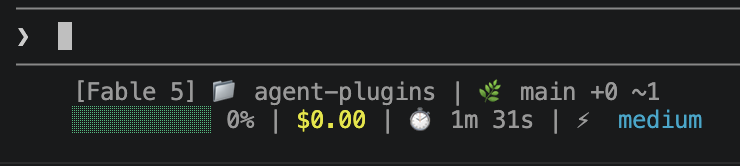
I get a lot of enjoyment out of fine-tuning the tools I use every day. Whether it’s my editor, terminal, or shell, I’m always looking for small improvements that make my workflow faster and more enjoyable. The status line is one of those details that often goes unnoticed, but when it’s thoughtfully designed, it provides exactly the information you need at the right time. In this post, I’ll share how I customized mine and the code behind it.
#!/bin/bash
input=$(cat)

MODEL=$(echo "$input" | jq -r '.model.display_name')
DIR=$(echo "$input" | jq -r '.workspace.current_dir')
SESSION_ID=$(echo "$input" | jq -r '.session_id')
PCT=$(echo "$input" | jq -r '.context_window.used_percentage // 0' | cut -d. -f1)
COST=$(echo "$input" | jq -r '.cost.total_cost_usd // 0')
DURATION_MS=$(echo "$input" | jq -r '.cost.total_duration_ms // 0')
EFFORT=$(echo "$input" | jq -r '.effort.level // empty')
CACHE_FILE="/tmp/statusline-git-cache-$SESSION_ID"
CACHE_MAX_AGE=5  # seconds

CYAN='\033[36m'; GREEN='\033[32m'; YELLOW='\033[33m'; RED='\033[31m'; RESET='\033[0m'
DIM='\033[2m'

# Pick bar color based on context usage
if [ "$PCT" -ge 90 ]; then BAR_COLOR="$RED"
elif [ "$PCT" -ge 70 ]; then BAR_COLOR="$YELLOW"
else BAR_COLOR="$GREEN"; fi

FILLED=$((PCT / 10)); EMPTY=$((10 - FILLED))
printf -v FILL "%${FILLED}s"; printf -v PAD "%${EMPTY}s"
BAR="${FILL// /█}${PAD// /░}"

MINS=$((DURATION_MS / 60000)); SECS=$(((DURATION_MS % 60000) / 1000))

# Color-code effort level, build optional segment
EFFORT_SEG=""
if [ -n "$EFFORT" ]; then
    case "$EFFORT" in
        low)        EFFORT_FMT="${DIM}${EFFORT}${RESET}" ;;
        medium)     EFFORT_FMT="${CYAN}${EFFORT}${RESET}" ;;
        high|xhigh) EFFORT_FMT="${YELLOW}${EFFORT}${RESET}" ;;
        max)        EFFORT_FMT="${RED}${EFFORT}${RESET}" ;;
        *)          EFFORT_FMT="$EFFORT" ;;
    esac
    EFFORT_SEG=" | ⚡ ${EFFORT_FMT}"
fi

cache_is_stale() {
    [ ! -f "$CACHE_FILE" ] || \
    # stat -f %m is macOS, stat -c %Y is Linux
    [ $(($(date +%s) - $(stat -f %m "$CACHE_FILE" 2>/dev/null || stat -c %Y "$CACHE_FILE" 2>/dev/null || echo 0))) -gt $CACHE_MAX_AGE ]
}

if cache_is_stale; then
    if git rev-parse --git-dir > /dev/null 2>&1; then
        BRANCH=$(git branch --show-current 2>/dev/null)
        STAGED=$(git diff --cached --numstat 2>/dev/null | wc -l | tr -d ' ')
        MODIFIED=$(git diff --numstat 2>/dev/null | wc -l | tr -d ' ')
        echo "$BRANCH|$STAGED|$MODIFIED" > "$CACHE_FILE"
    else
        echo "||" > "$CACHE_FILE"
    fi
fi

IFS='|' read -r BRANCH STAGED MODIFIED < "$CACHE_FILE"

COST_FMT=$(printf '$%.2f' "$COST")

if [ -n "$BRANCH" ]; then
    echo "[$MODEL] 📁 ${DIR##*/} | 🌿 $BRANCH +$STAGED ~$MODIFIED"
else
    echo "[$MODEL] 📁 ${DIR##*/}"
fi
echo -e "${BAR_COLOR}${BAR}${RESET} ${PCT}% | ${YELLOW}${COST_FMT}${RESET} | ⏱️ ${MINS}m ${SECS}s${EFFORT_SEG}"
Looking for a deeper dive? This post focuses on my implementation. For a complete explanation of every status line component, see the official Claude Code Status Line documentation.